
AI Home Design - Decor
Fenix MobileHouse & Home
4.78.00 Reviews
- Version
- 2.5.0
- Installs
- 10.00K
- Age Rating
- Everyone
Screenshots


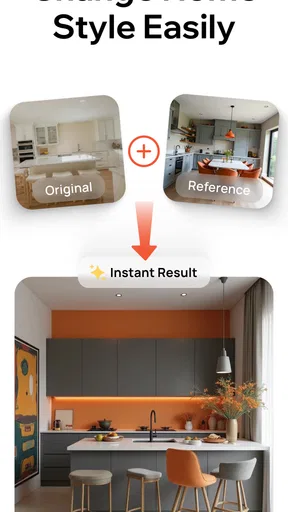
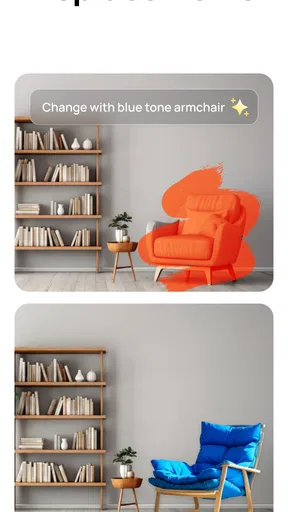
Our Review of AI Home Design - Decor
 Analysis by Appyee
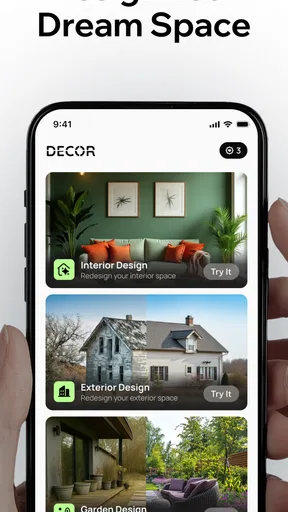
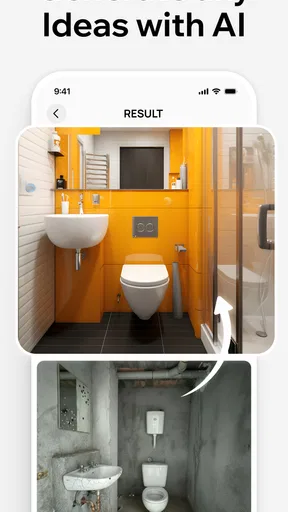
I tried AI Home Design - Decor with a simple question in mind: would it remain useful after the first few impressive room makeovers, or would it become another app I open once and forget? My first impression was positive. The idea is straightforward: upload a photo of a room, choose a visual direction, and use the result to imagine how the space might look with a different atmosphere. It sits in the House & Home category, where the most useful tools usually help with a real decision rather than merely producing attractive pictures.
That distinction matters here. This is not a replacement for an architect, interior designer, contractor, or shopping plan. I see it more as a fast visual thinking tool. It helps me move from “this room feels dull” to “perhaps a warmer, cleaner, or more modern direction would work.” The app is free to install, rated for Everyone, and developed by Fenix Mobile. Its current version is 2.5.0, and it runs on Android 7.0 or later, which makes it accessible to people using older phones as well as newer devices.
From first-week excitement to a practical design habit
The strongest part of the first week is the low effort. I do not need to redraw a floor plan or learn a complicated design program before seeing an idea. A room photo gives the app a starting point, and the generated redesigns make comparison feel immediate. That is especially useful when I know I dislike the current look but cannot describe what should replace it.
I found the best results came from treating each image as a question, not an answer. Instead of asking the app to “make the room better,” I would consider a more specific direction: should the space feel calmer, brighter, more welcoming, or less crowded? This small change in thinking makes the images easier to judge. A design that looks attractive in isolation may still be wrong for the way a room is used every day.
For example, imagine a living room that doubles as a work area. A dramatic makeover may look polished, but it could make the desk feel visually disconnected or leave the room looking impractical. I would compare styles while checking whether the seating, lighting, storage, and walking path still make sense. The app is valuable because it encourages that conversation before money is spent, but the user still has to supply the practical judgement.
One useful first-week workflow is to photograph the space from the same position before trying different directions. Keeping the viewpoint consistent makes comparisons more meaningful. If every attempt uses a different angle, it becomes difficult to tell whether the style changed the room or the camera simply presented it more favorably. I would also save only the strongest options rather than collecting every appealing image. Too many variations can create indecision instead of clarity.
The app works particularly well for renters, first-time decorators, and anyone preparing to refresh one room without committing to a complete renovation. It can also help couples or housemates discuss preferences. Showing two or three visual directions is often easier than arguing over vague descriptions such as “cozy but not old-fashioned” or “modern without feeling cold.” In that role, the app becomes a shared reference point.
Its average rating is 4.7 from around 1.1 thousand ratings, and the app has passed 10 thousand installs. Those figures suggest that the concept is connecting with a real audience, although they do not change the practical limitation I noticed: generated inspiration is not the same as a verified plan. I would use the images to narrow choices, then measure the room, check product dimensions, and confirm whether the proposed arrangement is possible.
What the images are good at—and where I stop trusting them
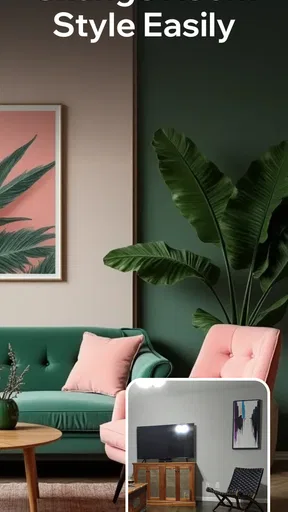
The visual output is most helpful for broad mood and direction. Color relationships, general furniture character, and the overall feeling of a room are easier to imagine after a redesign than from a blank mental picture. This is where the app can save time. I can reject an entire style direction quickly instead of buying samples or browsing dozens of unrelated rooms.
I would be cautious with exact details. A generated image should not be treated as proof that a particular sofa will fit, that a cabinet can stand in a certain location, or that a wall can support an imagined feature. Lighting and perspective can also make a room appear more spacious or balanced than it really is. For a serious renovation, a measured plan or professional consultation remains the better option.
That trade-off is important for anyone deciding whether the free entry point is enough. The app is excellent for exploration, but it does not remove the work of checking dimensions, materials, costs, installation, or building restrictions. I would never order furniture solely because it looked right in one generated image.
A realistic everyday use case
Consider someone preparing a small bedroom for a child or visiting relative. The room may contain mismatched furniture, limited storage, and a paint color that feels too dark. I would take a clear photo, explore several styles, and use the results to decide whether the first priority should be lighter walls, fewer visible objects, a different bed position, or more organized storage. Then I would make a short list of changes that are actually affordable and reversible.
The app is particularly useful at the beginning of that process. It helps separate a genuine design problem from a clutter problem. Sometimes the imagined improvement comes less from buying new furniture and more from simplifying the arrangement. That is a non-obvious benefit: the visual comparison can reveal that the room needs editing rather than decoration.
I would also use it before visiting a furniture store. A quick visual direction can prevent me from buying individual pieces that look attractive but do not belong together. The app cannot guarantee that real products will match the generated image, yet it can give me a stronger filter. I can ask whether a potential purchase supports the chosen mood, scale, and function instead of reacting to each item separately.
Does it still earn a place after the novelty fades?
The first-week appeal is clear, but lasting value depends on whether I have recurring design decisions. Someone moving into a new home, preparing a room for sale, or planning several gradual updates may return to the app often. Someone with no upcoming changes may enjoy the novelty and then stop opening it. That is not a flaw unique to this product; it is the natural limit of an inspiration-focused tool.
For month-to-month use, I see three sensible roles. First, it can support staged decorating. Instead of changing everything at once, I can test a direction, make one real adjustment, and revisit the room later. Second, it can help compare seasonal or functional changes, such as making a sitting area feel warmer or creating a cleaner-looking workspace. Third, it can serve as a discussion tool when several people share responsibility for a home.
The strongest recurring workflow is to return after each real change and reassess the room as a whole. A new rug, sofa, paint color, or storage unit can alter the balance of everything around it. Generating another view at that point may help prevent the common mistake of decorating in isolated purchases. I would not use the app every day, but I can see a reason to use it at meaningful stages of a project.
There is also a useful trade-off between speed and precision. Traditional mood boards, saved product images, and interior-design websites often provide more realistic references, but they require more manual sorting. This app offers a faster way to explore a complete visual direction. On the other hand, a hand-built mood board is usually better when I need to track exact products, fabric colors, finishes, and prices. I would choose the app for early exploration and a more controlled board for final decisions.
Compared with a professional designer, the app is cheaper and less intimidating, but it cannot ask follow-up questions about lifestyle, budget, accessibility, structural limitations, or long-term maintenance. Compared with a standard photo editor, it is more useful for imagining a complete room direction, but less suitable for precise editing. Compared with browsing social media or design galleries, it gives me a version of my own space rather than someone else’s room, which makes the inspiration more personally relevant.
Keeping the process from becoming repetitive
The main source of fatigue is not the act of uploading a photo; it is the temptation to keep generating alternatives without making a decision. A stream of attractive possibilities can make a modest project feel bigger than it is. I recommend setting a purpose before each session. For example, decide whether the goal is to choose a color mood, evaluate furniture character, or rethink the room’s visual balance. Once that question is answered, stop.
Another practical tip is to compare designs against a short list of non-negotiables. If the room must retain a particular desk, accommodate pets, preserve open floor space, or avoid fragile surfaces, those conditions should guide the judgement. A beautiful image that ignores daily habits is not a successful design for that household. I found the app more useful when I judged it against real routines rather than visual appeal alone.
I would also avoid treating every generated change as a shopping list. One image may suggest a new wall color, different lighting, and several pieces of furniture at once. That can make the project feel expensive and overwhelming. Instead, I would identify the single change most likely to improve the room and test that first. This keeps the app connected to a manageable habit rather than turning it into a source of constant consumption.
Maintenance, cost, and the point where I would stop
The app itself is free, which makes experimenting easy. It includes in-app purchases ranging from $2.99 to $39.99 per item, so I would pay attention before committing to repeated use or unlocking additional value. For an occasional user, the free starting point may be sufficient to decide whether the visual approach fits their needs. For a person planning several rooms, the potential cost becomes more relevant, especially if the app is being used alongside real decorating expenses.
My maintenance burden would be modest in the beginning: take useful photos, keep the room view consistent, label or remember which direction each image represents, and avoid confusing inspiration with a final specification. The bigger burden is organizational. If I save many similar results without recording what I liked about each one, the collection quickly becomes difficult to use.
Privacy and comfort also deserve a practical thought whenever a home-photo app is used. I would avoid including personal documents, faces, addresses, or anything visible through windows that I would not want to share. I would photograph the room with the minimum context needed for the design question. That habit keeps the process focused and reduces unnecessary exposure of private details.
The app is not the right choice for someone who wants exact renovation drawings, reliable construction guidance, a product catalog tied to current stock, or a detailed budget. It is also a weak fit for users who already have a firm design plan and need accurate implementation documents. In those cases, a measurement-based planning tool, a spreadsheet, a professional service, or a conventional mood board would serve better.
I would skip it as well if I knew that visual alternatives tend to make me postpone decisions. Some people need constraints, not more options. If I already struggle to choose between paint samples, generating many complete room concepts may increase uncertainty. The app is most effective for users who can turn inspiration into a small, concrete next step.
My long-term verdict
After the initial excitement, I think AI Home Design - Decor earns a place as an occasional planning companion rather than a permanent daily app. Its lasting value comes from timing: before buying furniture, while comparing room directions, or when a space feels wrong but the solution is unclear. Those are real moments, and the app can make them easier to discuss and visualize.
I appreciate that it lowers the barrier to experimentation. I do not need specialist vocabulary to begin, and I can use my own room as the starting point instead of trying to translate an unrelated showroom image. The best results come when I use it to test a hypothesis, keep the successful direction, and then verify everything in the physical space.
The limitations are just as important. Generated designs can encourage unrealistic expectations, distract from measurements, and create an endless loop of attractive alternatives. The app cannot tell me whether a layout works for my habits, whether furniture will fit through a doorway, or whether a proposed change is worth its real cost. Those decisions remain mine.
With its Everyone rating and broad Android compatibility, it is approachable for casual users, while the free installation makes trying it low risk. The optional purchases mean I would review my usage before spending more, particularly if I only need one room explored. My recommendation is strongest for renters, new homeowners, redecorators, and people who communicate better through images than descriptions.
In my experience, the right way to keep this app useful is to give it a narrow job: use it to choose a direction, not to replace the design process. If I follow that rule, it remains helpful after the novelty fades. It becomes less of a room-makeover toy and more of a quick checkpoint before I spend time, money, or effort on changes that may not suit the way I actually live.
Verdict
Strengths of AI Home Design - Decor
- Generates room concepts quickly from photos or basic inputs.
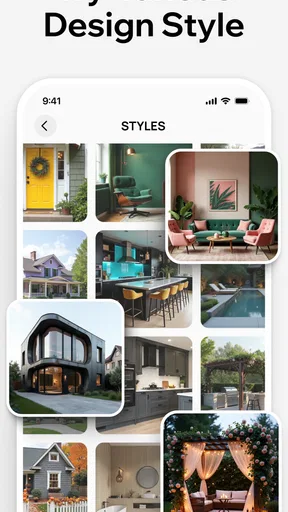
- Offers multiple interior styles for different tastes and spaces.
- Useful for gathering renovation inspiration before making purchases.
- Simple interface makes experimenting accessible to non-designers.
- Can help visualize color palettes, furniture, and decor combinations.
Limitations of AI Home Design - Decor
- AI results may alter room proportions or architectural details.
- Some features or designs may require a paid subscription.
- Generated furniture may not match products available in stores.
- Results can look repetitive when using similar styles or prompts.
- A stable internet connection may be needed for image processing.
Similar Picks in This Category
View All
Universal TV Remote Control
CodeMatics Media Solutions3.9

AlfredCamera Home Security app
Alfred Systems Inc.4.7

Planner 5D: AI Home Design
Planner 5D4.5

Universal Tv Remote-Cast to TV
One Music Player4.1

Zillow: Homes for Sale & Rent
Zillow Group4.8

99acres Buy/Rent/Sell Property
infoedge.com4.3
Frequently Asked Questions
What is AI Home Design - Decor and how does it work?
AI Home Design - Decor is an interior design app that uses artificial intelligence to help you visualize new ideas for rooms and living spaces. After uploading or selecting a room image, you can explore different styles, furniture arrangements, color palettes, and decorative concepts. The app generates design suggestions quickly, making it useful for inspiration before renovating, redecorating, or purchasing furniture.
Is AI Home Design - Decor suitable for beginners without design experience?
Yes. The app is designed to be accessible even if you have no professional interior design knowledge. Its AI-based suggestions can help you understand how different styles, colors, and layouts may look together. However, the generated results should be treated as creative inspiration rather than exact architectural plans, since room measurements, lighting conditions, furniture dimensions, and practical construction requirements may not always be represented accurately.
Can I use my own room photos to create personalized designs?
In most cases, the main appeal of AI Home Design - Decor is the ability to work from an existing room image or a selected space. Using your own photo can produce ideas that feel more relevant to your home than generic examples. For the best results, take a clear, well-lit picture with as little clutter as possible. Very dark, blurry, or heavily obstructed images may lead to less realistic design suggestions.
Is AI Home Design - Decor free to download and use?
The application may be available as a free download, but some features, design styles, image generations, or advanced tools can be restricted by usage limits, advertising, subscriptions, or in-app purchases. Before creating multiple designs, review the pricing information shown in the app store and inside the application. Subscription terms, trial periods, renewal conditions, and available features can vary depending on your device and region.
Are the AI-generated designs accurate enough for real renovation projects?
AI Home Design - Decor can be very helpful for visualizing moods, themes, and possible decoration directions, but its results should not replace professional planning. Generated images may change room proportions, ignore structural limitations, or show furniture that does not fit your actual space. Before making purchases or beginning construction, verify measurements, materials, electrical requirements, and safety details with a qualified designer, contractor, or other professional.
